Debugging CrashLoopBackOff in Production Kubernetes Pods
Track down why containers crash and restart with a structured diagnostic sequence.
Debugging CrashLoopBackOff in production Kubernetes pods means finding why a container exits. A structured sequence of container-state checks, exit-code triage, previous-instance logs, and events separates application failures from infrastructure constraints before any configuration changes. That sequence turns a broad symptom into a specific diagnosis and identifies the deployment gates that can prevent it from recurring.
What CrashLoopBackOff actually reports and what it does not
CrashLoopBackOff is a container-level waiting reason. The pod’s phase typically remains Running while the container repeatedly runs, terminates, and waits for another restart. Monitoring that watches only the pod phase can miss the condition altogether. Container state is the relevant signal. This also distinguishes CrashLoopBackOff from ImagePullBackOff, which occurs before the container starts.
The exponential backoff protects against resource exhaustion by spacing out restart attempts. Deleting and recreating the pod resets that timer, but the same failure recurs unless its cause changes. Recent Kubernetes releases allow some backoff tuning, with the node-level maximum taking precedence when both per-node and per-pod settings apply. That tuning changes the retry delay. The practical distinction is firm, because CrashLoopBackOff tells you that a container keeps exiting and tells you nothing about why.
Why the exit code is the fastest triage signal before reading any log
The exit code under Last State in kubectl describe pod provides the fastest first branch in the investigation. It narrows the six common cause classes before logs add application-specific detail. A code of 0 directs attention to workload type, because a process can finish successfully and still restart under a Deployment’s restartPolicy: Always. A code of 1 points instead to application startup, including unhandled exceptions, configuration errors, and failed dependency connections. Those outcomes need different fixes even when they show the same restart status.
A code of 137 indicates SIGKILL and requires distinguishing OOMKilled from forced deletion. A code of 139 points to a segmentation fault in native code, while 127 points to a command that cannot be found, such as a wrong path or typo in the container specification. A code of 143 indicates SIGTERM and a graceful termination that did not complete, a finding that requires further investigation. In particular, a liveness probe failure does not always have a distinctive exit code, so the decisive evidence may be a preceding Liveness probe failed event.
The four-step diagnostic sequence that separates cause from symptom
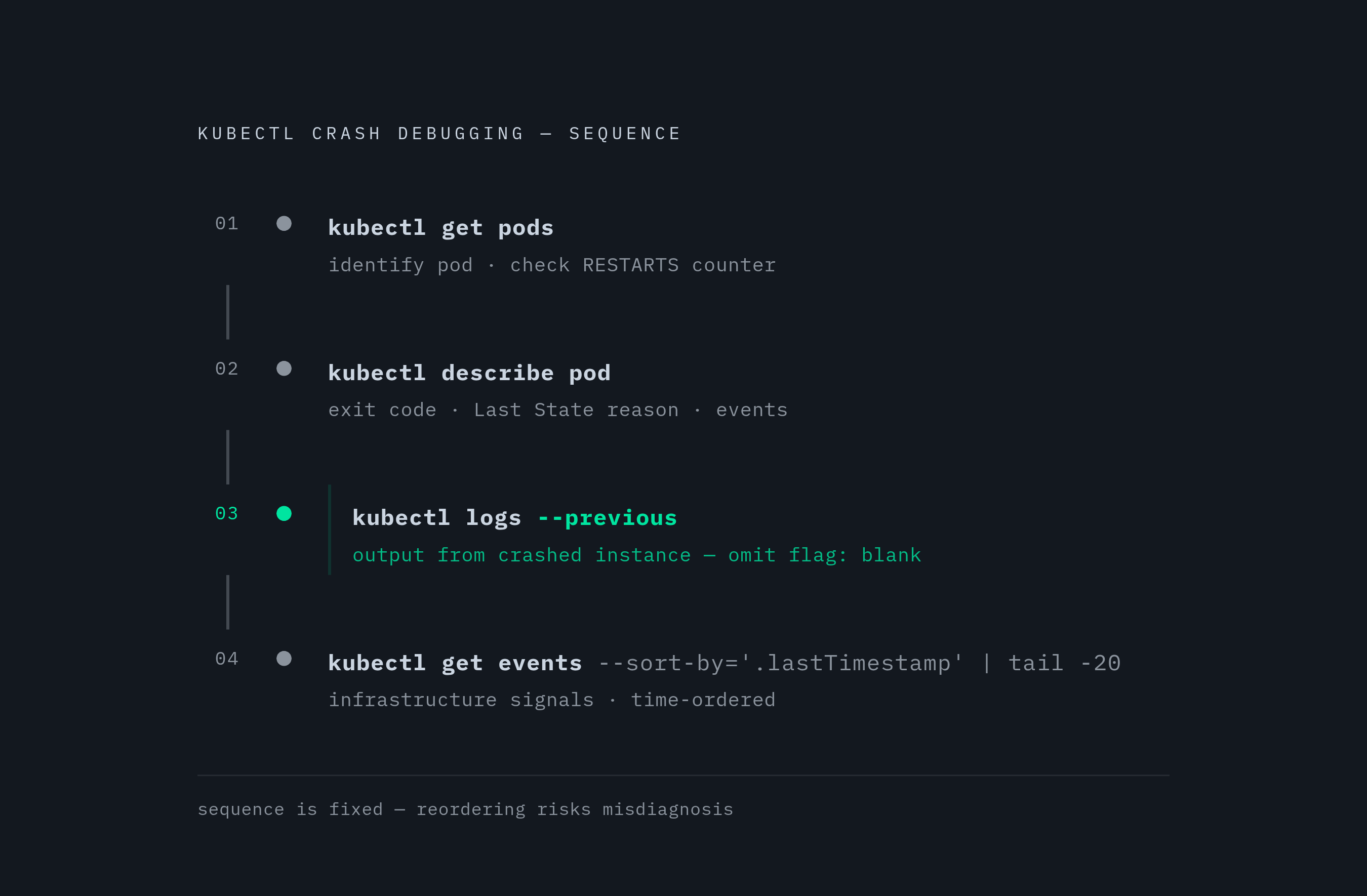
Begin with kubectl get pods -n <namespace> to identify the affected pod and inspect its RESTARTS counter. A high count signals a persistent problem that needs full investigation. This first step establishes which workload needs attention before the investigation moves into a particular container. The fixed sequence is get, describe, previous logs, then events. Keeping that order matters because what looks like a memory failure can be a liveness probe timeout that needs a different fix.
Next, run kubectl describe pod <name> -n <namespace>. Read the exit code and Last State reason. Then inspect the events included in the output. This is where the exit-code branches become useful in context. The same output can show FailedMount events, scheduling problems, and volume errors that application logs cannot explain.
Then run kubectl logs <name> -n <namespace> --previous to retrieve output from the crashed container instance. Without --previous, the current instance may give blank output and hide what happened in the failed attempt. For a multi-container pod, add -c <container-name> to override the default selection and target the failing container. For an init container, retrieve its name with kubectl get pod <name> -o jsonpath='{.spec.initContainers[*].name}', then use both -c <init-container-name> and --previous when reading its logs. The main application’s logs cannot explain an init failure when that application has never started.
Finally, run kubectl get events -n <namespace> --sort-by='.lastTimestamp' | tail -20. The events, in time order, show infrastructure signals such as scheduling failures, image pull errors, and volume mount failures. They also place probe failures before the restarts they caused. Read that chronology against the previous-instance logs rather than treating either source as sufficient alone. Only then does a configuration change have an identified cause to address.
Application startup crashes and missing configuration as the most frequent cause
In the payment microservice namespace-migration case, the diagnostic finding was a missing production Secret. The db-credentials Secret existed in staging but had never been created in production. The migration checklist covered Deployment and Service manifests without covering the Secrets those manifests referenced. A pre-deployment check of referenced resources in the target namespace would have caught the omission.
Application startup errors and missing Secrets or ConfigMaps account for the largest share of these incidents, but their evidence appears at different layers. For an application that starts and exits with code 1, the stack trace in kubectl logs --previous is the primary artifact. A common failure is an attempt to connect to a database or downstream service that is not yet reachable, with the application treating that condition as fatal. Retry logic and graceful startup error handling address the failure in the application. An init container that waits for the dependency provides the Kubernetes-side alternative.
By contrast, a missing required Secret or ConfigMap can leave the pod in CreateContainerConfigError, with the main container never starting. In that case, kubectl describe pod exposes FailedMount or reference errors. Inspect the environment references with kubectl describe pod <name> | grep -A5 "Environment", then use kubectl get secret <name> -n <namespace> to check the Secret in the target namespace. The optional: true field on a configMapKeyRef or secretKeyRef is appropriate only for non-critical configuration, never required credentials. The durable prevention is a CI step that validates all referenced Secrets and ConfigMaps before applying manifests.
OOMKill loops and why memory limits set from guesswork reliably fail
If the memory limit is below what the application needs during every startup, the Linux OOM killer terminates the process before it stabilizes. Kubernetes restarts it under the same constraint, so the next attempt reaches the same result. Deleting the pod over and over cannot make that limit high enough. Exit code 137 is the initial clue, while the OOMKilled reason distinguishes this path from other SIGKILL outcomes.
For JVM workloads, a frequent sizing mistake is setting -Xmx equal to the container memory limit. The JVM also needs memory for Metaspace, Thread Stacks, Native Memory, Code Cache, GC overhead, and Buffers beyond its Heap. With no allowance for those uses, the process can hit the cgroup limit before the heap fills. Set -Xmx to approximately 75% of the container memory limit, so a 512Mi limit should have -Xmx384m.
Raising the memory limit in the pod specification is the immediate fix for an insufficient limit. For the longer-term fix, profile how much memory the runtime uses under production load before choosing the limit. For managed runtimes, that measurement must cover non-heap overhead as well as the memory measure that application developers see most often. The sizing rule provides a concrete starting point, while profiling grounds the final limit in the workload.
Liveness probe misconfiguration as a self-inflicted restart loop
A liveness probe can cause a restart loop that never ends even when the application starts normally. If the probe fires while initialization is still in progress, it fails and Kubernetes kills the container before startup completes. Previous-instance logs then show ordinary startup output, while events show Liveness probe failed: connection refused before the restart. That contrast is the diagnostic signature.
The basic requirement is that liveness must not interrupt the application’s startup period. Increasing initialDelaySeconds is the simpler approach because it needs no separate probe block. A dedicated startupProbe instead adapts to actual startup completion rather than waiting the full maximum on every restart. Once startup succeeds, liveness can operate with tighter thresholds. This separates the allowance for initialization from the checks used during steady operation.
If failureThreshold × periodSeconds is shorter than real boot time on a slow node or after a cold container pull, the startup probe recreates the loop it was meant to prevent. Size that budget to the real worst-case boot time, then use tight liveness checks for steady-state detection. That approach avoids using a single large initialDelaySeconds that slows detection of genuinely stuck processes.
When liveness checks database connectivity, a database outage can cause all pods to restart. Those pods cannot reconnect during restart, then restart again, spreading CrashLoopBackOff across the fleet from one dependency failure. Liveness should check only whether the process is responsive and not deadlocked. Move dependency health checks to readiness, where a failed check takes the pod out of load balancer rotation without killing it.
Exit-zero loops and init container failures as two different patterns
A clean exit can be the entire explanation for a restart loop. Deployments use restartPolicy: Always, so a short-lived script or batch workload restarts even after completing successfully. The decisive signal is code 0 in Last State, with no stack trace or error message required. Move short-lived workloads to a Kubernetes Job, or a CronJob for scheduled tasks. The correction is to match the workload controller to completion rather than search for an application crash that did not happen.
Init container failures invert the usual investigation because the main application never starts. They surface as Init:CrashLoopBackOff, and their causes commonly include an unreachable dependency or a missing Secret or ConfigMap. Get the init container names and read the failed attempt’s logs with the commands for that container from the diagnostic workflow. Describe output can also show FailedMount or connection timeout errors before there are any main-container logs. Adjust the readiness check command or timeout for an unreachable dependency, or create the missing resource in the namespace before applying the Deployment.
Moving from reactive debugging to preventing the loop before it starts
The shift from response to prevention is to map each diagnosed cause to a deployment gate. Checking manifests in CI can catch configuration problems before they reach a cluster. Tools such as kube-score check best practices, including whether resource requests and limits are set, how probes are configured, and what security context settings are in place. Target-namespace checks for referenced Secrets and ConfigMaps address the migration gap directly. These checks work alongside application retry handling and the choice of the right workload controller, both of which are still needed.
Deployment safeguards can also keep a failed release from leaving workloads in a restart loop. Helm’s --atomic flag rolls back a release that fails to reach a healthy state and implicitly enables --wait. A Prometheus alert on restart rate gives teams an earlier opportunity to apply the diagnostic sequence before counts escalate to customer impact. VPA recommendations base resource settings on observed use so teams no longer have to guess them. GitOps patterns through Argo CD or Flux support configuration consistency across namespaces and environments.
Existing workloads need these controls as much as new deployments do. Fairwinds Insights, Polaris, and Goldilocks provide continuous checks and recommendations that extend validation beyond CI. Polaris checks for probes and resource requests and limits, while Goldilocks supports resource right-sizing recommendations. Together, those capabilities help expose weaknesses in workloads that predate newer pipeline rules. The governing principle is architectural, because fewer CrashLoopBackOff incidents follow when each loop is treated as evidence of a missing gate.
Sources
- Debug a Pod in CrashLoopBackOff on Kubernetes: Causes and Solutions
Provided background on CrashLoopBackOff causes, exit code triage, kubectl diagnostic commands, and remediation patterns covered throughout the article.