Cloud Egress Cost Reduction Strategies
Hidden multipliers and optimization strategies cut cloud egress costs by half or more.
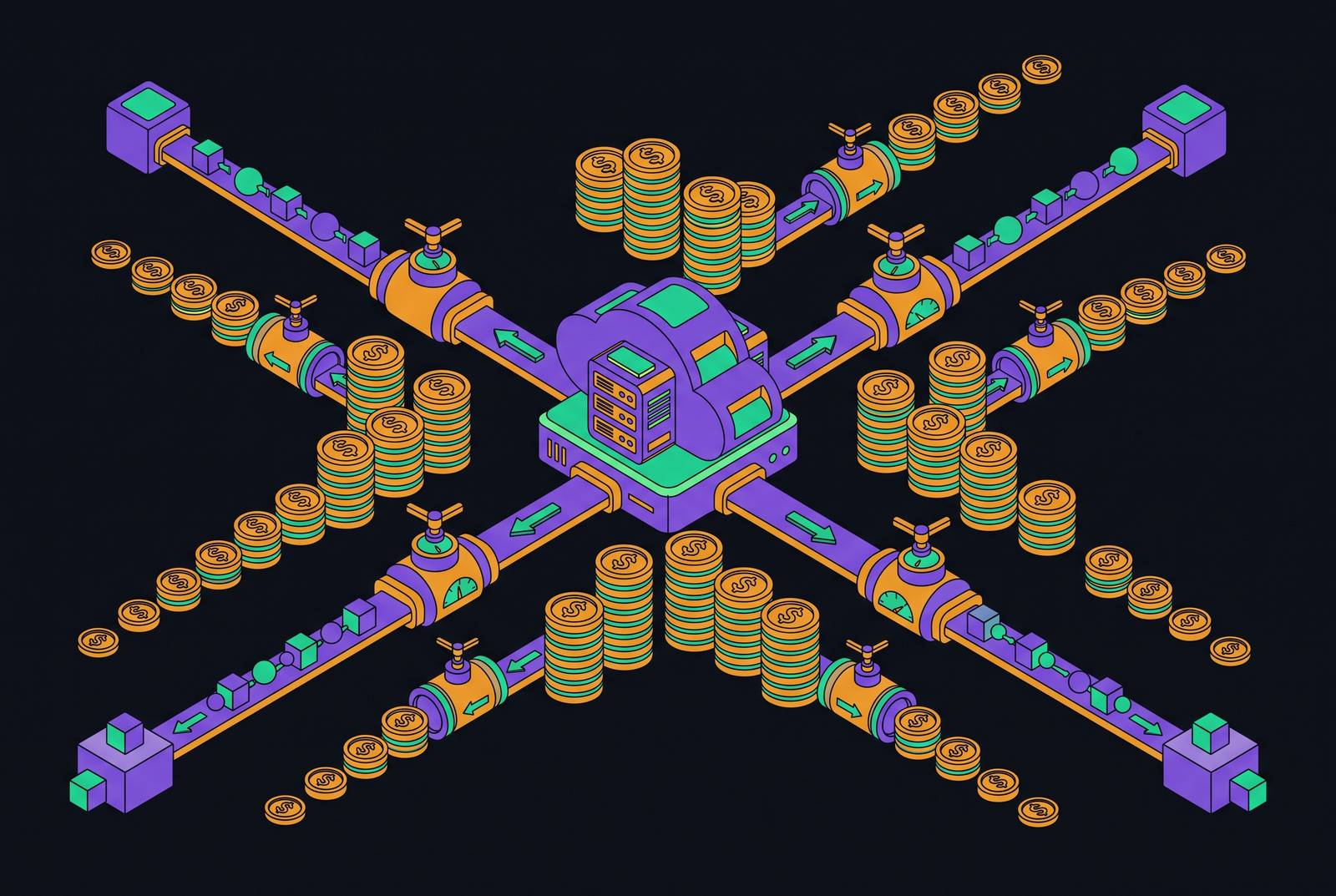
Egress is what a cloud provider charges when data leaves its network: out to the internet, over to another cloud, or back to a data center a company still runs itself. Ingress, the data coming in, is free everywhere. That asymmetry is the whole game, and it's why egress costs build up quietly in the background of a cloud bill until a budget review reveals a number nobody can quite explain. By most accounts, data transfer is widely treated as a major cost category on a cloud invoice alongside compute and storage, and unlike compute, it rarely gets sized before someone commits to a workload. What follows is a playbook: where the money actually goes, how to see it before it becomes a crisis, and which fixes are worth an afternoon versus a quarter.
Backup jobs syncing overnight, API responses going out to mobile clients, disaster-recovery tests, cross-region replication running in the background: none of these appear as a single alarming line item. Egress can account for a meaningful share of total storage cost, roughly 6% by some measures, before anyone treats it as a line worth managing on its own.
The real per-GB price across providers, including the multipliers most teams miss
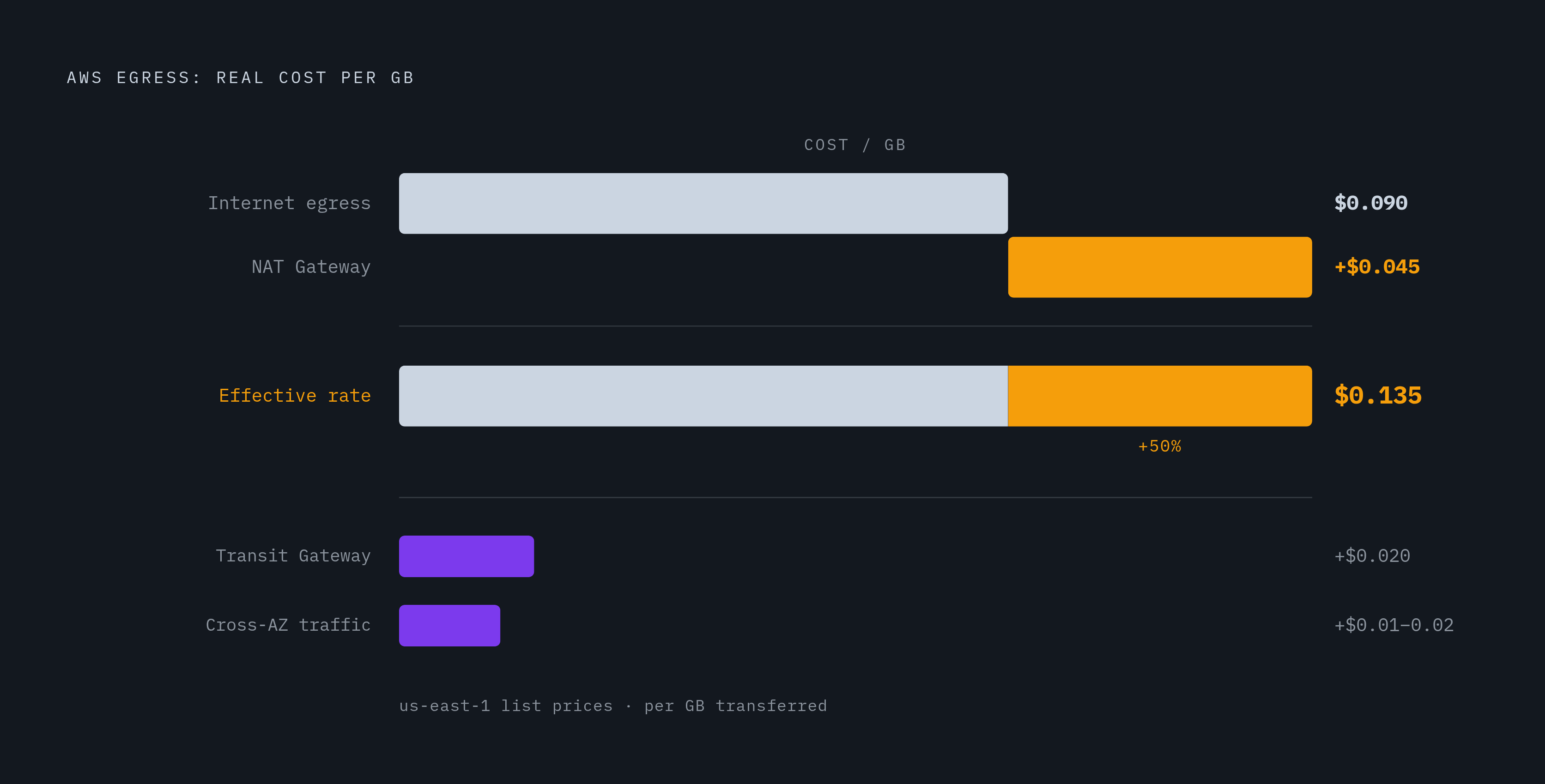
Headline internet egress rates look almost comparable across the big three: AWS charges $0.09 per GB, Azure $0.087, GCP $0.12. Cloudflare R2 charges $0.00 per GB, an exception, not the norm. Volume discounts kick in eventually, AWS tapers to $0.05/GB past 150 TB a month and Azure has a similar high-volume taper, but many teams transfer at volumes where none of that applies. They pay the sticker price.
The sticker price is also not the real price, and this is where teams get surprised. Traffic from a private subnet routed out to the internet through a NAT Gateway on AWS adds $0.045/GB in processing charges on top of the $0.09 egress rate, so a byte that looks like it costs nine cents actually costs $0.135. Cross-AZ traffic, the kind that piles up fast in a microservices architecture where every service call crosses an availability zone, runs $0.01 to $0.02/GB round trip, and it's easy to miss because no single call looks expensive. Inter-region replication runs about $0.02/GB, which sounds trivial until a 2 TB nightly backup to a secondary region turns into $1,200 a month in fees that have nothing to do with storage. Transit Gateway tacks on another $0.02/GB for anything it processes, regardless of where that data ends up.
The pattern is most visible in AI infrastructure spend. A team that shopped GPU rental rates and locked in H100 compute at $12,000 a month can open an AWS invoice and find $14,200. The $2,200 gap is egress, moving training data, checkpoints, and inference results across regions and out to the internet, and it never appeared in the GPU price comparison that drove the provider decision.
Getting visibility before spending a dollar on optimization
FinOps tooling can tell an organization exactly where its egress dollars go. It cannot change what the provider charges per gigabyte. That distinction matters because visibility is often mistaken for the fix itself, when really it's the prerequisite: without it, every optimization decision is a guess dressed up as a strategy.
A four-hour audit answers most of the questions that matter. What share of the monthly bill is egress? Above 15%, it's a target; above 25%, the organization is actively losing money it doesn't have to lose. What's the average API latency for users outside the primary region? If that number isn't already known off the top of someone's head, the absence of an answer is itself the answer. Which workloads are stateless and which are stateful? Stateless work, meaning API responses, authentication, static asset delivery, edge functions, are candidates to move elsewhere. Stateful work, databases, job queues, anything holding persistent state, stays put. And egress cost per monthly active user, tracked over time, tells you whether the architecture is scaling in the company's favor or against it: if that per-user number climbs faster than revenue, the infrastructure is working against the business model, not for it.
None of this is traceable without tagging. Consistent tags on workloads, network paths, and connections are what let a finance team point at a dollar figure and say which team, which application, or which environment produced it. Without that step, even the best dashboard is just an aggregate number with no story behind it. Without that step, unexpected charges can compound for months before anyone connects a dollar figure to its source.
VPC endpoints: the five-minute fix with immediate payoff
This is the fix with the best ratio of effort to savings in the entire playbook. A Lambda function or EC2 instance calling S3 or DynamoDB through a NAT Gateway pays for that traffic twice: $0.045/GB in NAT processing, plus $0.09/GB in egress, even though the data never actually left AWS's network in any meaningful sense. A VPC Gateway Endpoint removes both charges for those two services.
Gateway Endpoints cost nothing to run, they cover S3 and DynamoDB specifically, and setting one up takes about five minutes in the AWS console. For services outside that pair, Interface Endpoints, built on AWS PrivateLink, cover dozens more: SNS, SQS, Kinesis, and others. Those aren't free, they run around $0.01/GB processed, but that's still a fraction of the internet egress rate for any workload moving meaningful volume.
The practical instruction here is blunt: check every VPC in the account. If S3 or DynamoDB traffic is routing through a NAT Gateway right now, adding a Gateway Endpoint is something to do this afternoon. It's something to do this afternoon.
CDN placement and caching: the strategy with the largest absolute savings for most teams
A content delivery network sits between the cloud origin and the people actually requesting the content. Once something is cached at an edge location, every repeat request gets served from there, and the origin never sees that traffic again. It never generates an origin egress charge again either.
The scale of the effect is large. Cloudflare has reported that putting a CDN in front of a typical web application cuts origin egress by 50 to 70%, and an 80% cache hit rate translates directly into an 80% cut in origin egress, because cache hit rate and avoided origin traffic are, for practical purposes, the same number. On AWS, CloudFront charges $0.085/GB for the first 10 TB, slightly under the $0.09/GB charged for egress straight off EC2, and S3-to-CloudFront transfer within the same region is free (cross-region fetches still carry the usual inter-region charge), which makes CloudFront the cheaper path for serving static content by a wide margin. Azure's CDN and Google's Cloud CDN follow the same logic, at lower rates than serving traffic directly from compute or storage.
For most teams, this is where the biggest single number on the savings sheet comes from. Compute optimization and endpoint fixes matter, but caching removes entire categories of egress from the bill, not fractions of it.
Data compression as a multiplier on every other strategy
Every strategy above works on the assumption that the number of bytes leaving the network is fixed. Compression breaks that assumption, because it shrinks the byte count before any egress charge gets applied at all, which means it makes every other tactic in this playbook cheaper on top of whatever it saves on its own.
Gzip, still the default in most stacks, cuts text-based payloads (HTML, CSS, a scripting language, JSON, XML) by 60 to 80%. Brotli, newer and less universally deployed, beats gzip by another 15 to 25% on top of that. Run the numbers on a workload moving 10 TB a month of API responses: turning on Brotli can bring the actual bytes transferred down to somewhere in the 2 to 4 TB range, which on AWS pricing works out to a substantial monthly saving, from a setting.
Compression can be turned on at the application server, at the API gateway layer, or at the CDN. Enabling it at the CDN is the path of least resistance: no application code changes, no redeployment, just a configuration flag.
Moving stateless workloads to the edge: the architectural shift that breaks the ceiling
Right-sizing instances and buying reserved capacity typically trims a cloud bill by 15 to 25%, and that's real money. But it's also a ceiling. FinOps discipline can find waste and eliminate it; it cannot touch the per-GB price the provider has set, because that price is an architecture decision, and the only way past it is to change where the workload actually runs.
The stateless-versus-stateful split from the visibility audit earlier becomes the decision boundary here. Stateless workloads, API responses, authentication checks, static asset delivery, edge functions, don't need to sit inside a centralized cloud region. They can run on a distributed network with points of presence closer to users. Stateful workloads, databases, job queues, anything holding persistent data, stay exactly where they are. Nothing about this argument asks a company to move its database to the edge; it asks a company to stop paying centralized egress rates for the fraction of its traffic that never needed to be centralized.
Teams that make this split report 60 to 80% reductions in egress cost, and moving stateless workloads closer to users typically improves latency for those outside the primary region as well. That second benefit isn't a side effect, it's often the more valuable one, because the same change solves a performance problem and a billing problem at once. The 80/20 shape of this means the goal isn't a wholesale migration, it's identifying the roughly 20% of workloads driving 80% of the egress line and moving just that slice.
Private connectivity: when the math justifies a dedicated line
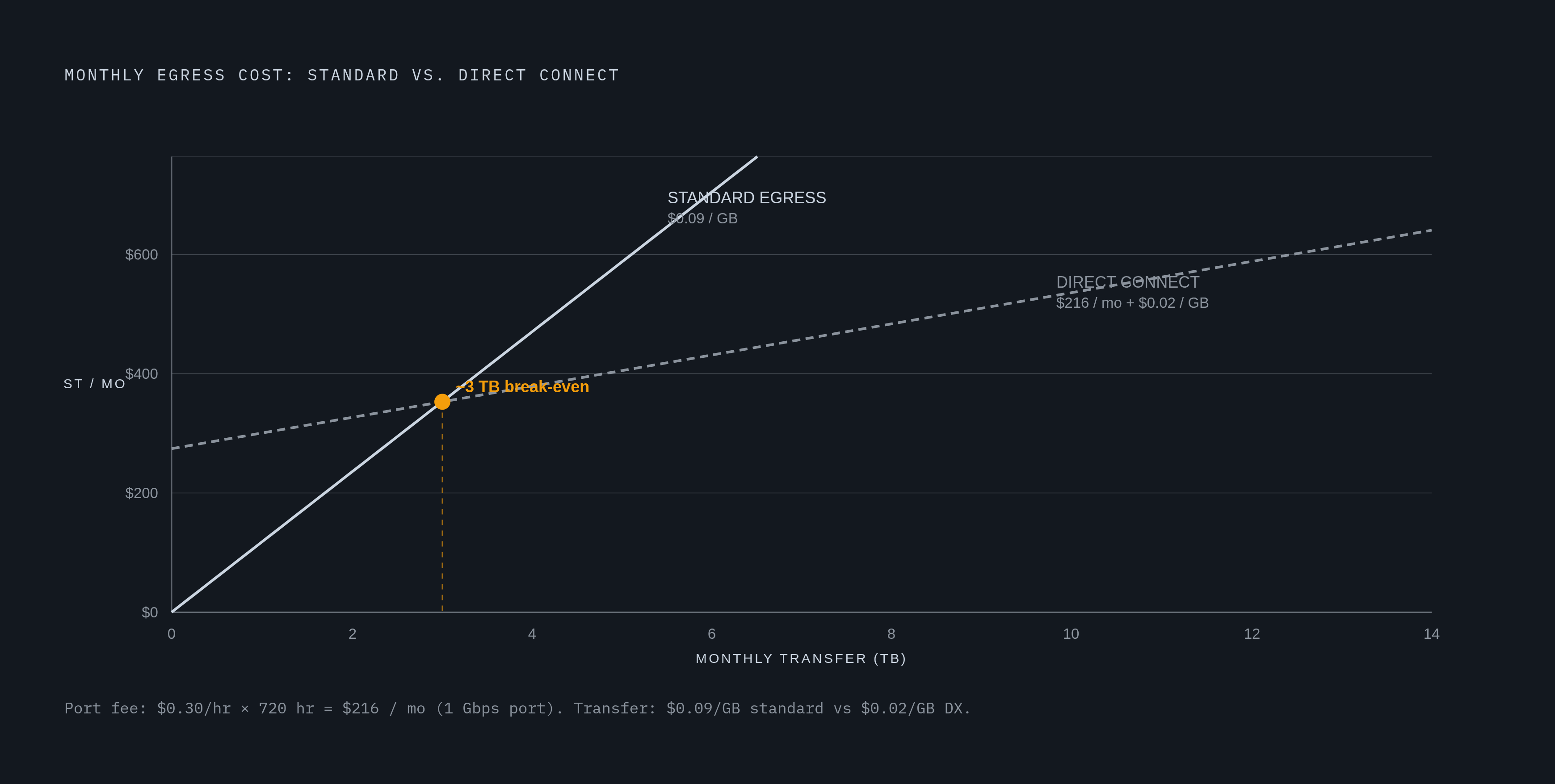
Dedicated private connections solve a different problem: instead of paying the public internet egress rate at all, an organization pays a fixed monthly port fee plus a much lower per-GB rate over a physical or logical line straight into the provider's network.
AWS Direct Connect brings egress down from $0.09/GB to $0.02/GB on traffic that runs over the dedicated connection. A 1 Gbps connection costs around $0.30 an hour for the port, plus the $0.02/GB outbound charge, and the math tends to break even against standard egress pricing somewhere around 5 to 7 TB a month, below that volume, it's not worth the fixed cost. GCP's Dedicated Interconnect at 10 Gbps runs about $1,700 a month for the port, depending on regional availability, plus the same $0.02/GB outbound; Partner Interconnect offers smaller commitments, from 50 Mbps up to 10 Gbps, priced proportionally for teams that don't need a full dedicated circuit. Azure's ExpressRoute has the widest range of entry points: the Local SKU starts around $55 a month for a 50 Mbps metro circuit, while the Standard SKU at 1 Gbps runs about $300 a month plus $0.025/GB in Zone 1 on metered plans, or a flat rate with no per-GB charge at all on the Unlimited Data plan.
None of these make sense below a certain volume. Above it, they're the clearest case in this entire playbook of trading a variable cost for a fixed one, and knowing where that crossover point sits for a given workload separates a private line saving real money from one sitting half-utilized as a sunk cost.
Sources
- How to Lower Your Egress Fees in 2026 | Megaport
- How to Reduce Cloud Egress Costs: A Complete Guide
- Holori - Guide: 10 Useful Tips About Reducing Cloud Data Transfer Costs in 2026
- vantage.sh
- 12 Proven Strategies to Reduce Cloud Egress Costs (2026)
- Cloud Egress Costs 2026: AWS vs GCP vs Azure for SaaS | MatrixGard
- Egress Fees Explained: The Complete 2026 Guide to Cloud's Most Hated Cost - Data Storage
- sedai.io