Structured Logging Pipelines From Application to S3 With Fluent Bit
Fluent Bit routes structured logs to S3 for queryable storage and analysis at scale.
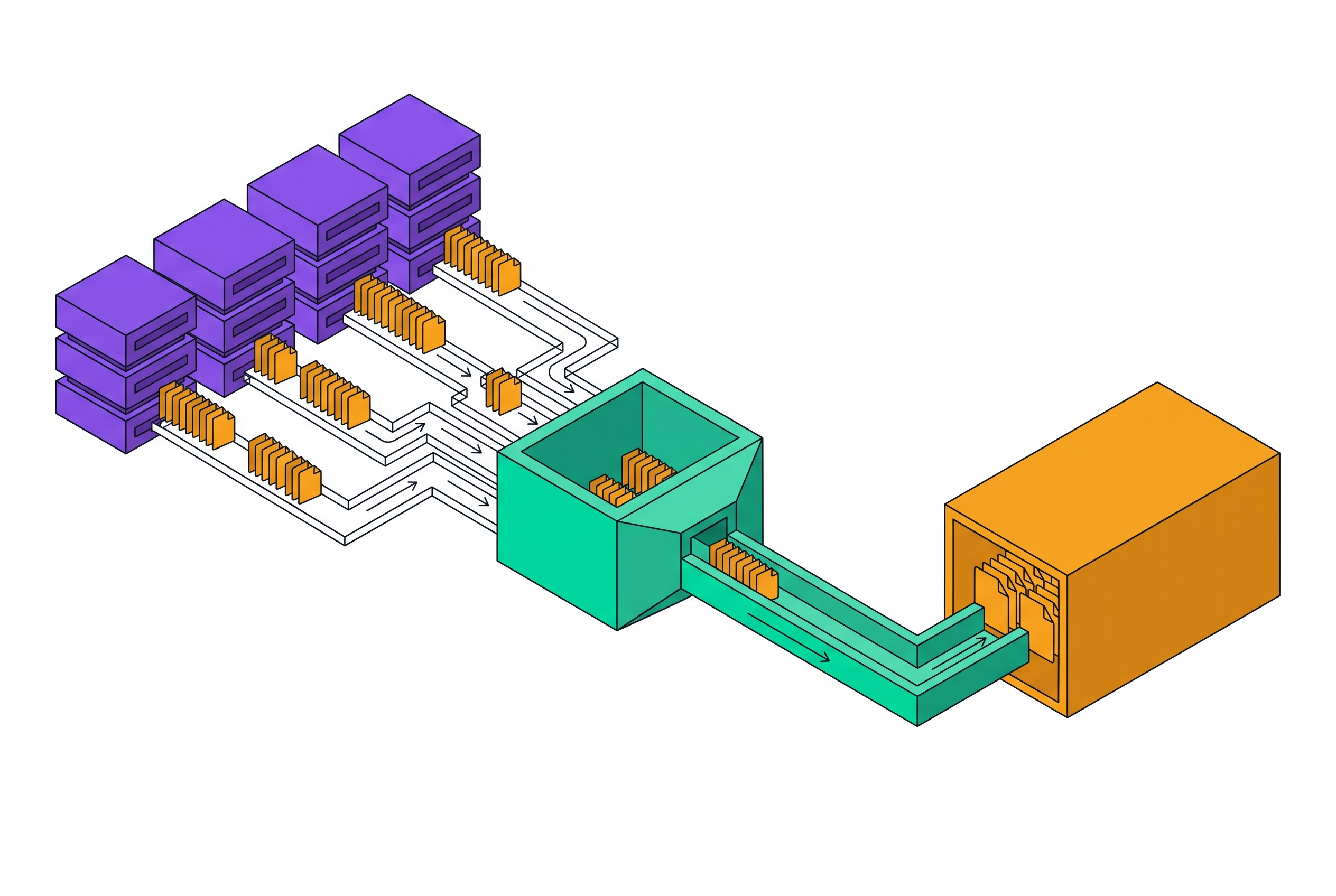
Moving a log line from a running container to a queryable object in S3 is a sequence of choices, each with consequences for cost, reliability, and whether anyone can actually find the data later. Distributed, containerized applications produce log volumes that make naive shipping unreliable: the data arrives unstructured, from many sources at once, and has to survive the destination going away for a few minutes without getting lost. S3 is picked as that destination not just because storage is cheap there, but because logs sitting in S3 can be queried with Amazon Athena using plain SQL, processed with AWS Glue, or pulled into a SIEM, none of which work on a pile of raw, unpartitioned blobs. Fluent Bit sits at the front of this process: a lightweight, C-language log processor and forwarder, developed as a CNCF graduated sub-project under Fluentd, built for exactly this job at the edge of containerized environments. Its memory footprint, around 450 kilobytes, is small enough to run as a DaemonSet on every node without taxing the workloads it watches. What follows walks that path stage by stage, starting at the point where logs first enter the pipeline.
Capturing logs at the input stage: what Fluent Bit can read
The input stage decides two things at once: what log data gets into the pipeline, and what metadata rides along with it for every stage after. That second part is easy to underrate, because it shapes every filtering and routing decision made later. In a Kubernetes cluster, the standard setup uses the tail plugin reading /var/log/containers/*.log, with Path /var/log/containers/*.log, Parser cri, and Tag kube.*, following the pattern shown in the oneuptime.com Flux CD guide.
The S3 output plugin cannot route records based on what's inside them, on a field value or a namespace name, only against the tag set here at input, so everything later depends on that tag being set correctly. It can only match against the tag. Everything the pipeline will later do in terms of sorting logs into the right S3 prefixes, the right buckets, the right partitions, depends on a tag that was set correctly back at input. A tag scheme that's an afterthought at this stage becomes a routing problem everywhere else.
Fluent Bit also treats its own internal diagnostics as just another input. Through the fluentbit_logs plugin, Fluent Bit's internal log output becomes structured records in the same pipeline, each one carrying a level field and a message field, so operators can ship Fluent Bit's self-diagnostics through the identical path used for application logs. This plugin pushes records as they're generated rather than waiting to be polled, so there's no delay between an internal event and its appearance as a record. But the queue backing it holds only up to 1024 entries in memory: anything produced before the pipeline is ready, or while that queue is already full, never gets delivered. That's a real limit for anyone leaning on Fluent Bit's self-diagnostics to debug the pipeline itself.
Further back in the same input configuration, settings like Mem_Buf_Limit, Skip_Long_Lines, and Refresh_Interval, as set out in the oneuptime.com guide, control how much of a burst Fluent Bit can absorb before the pressure reaches back to the application producing the logs. Pipeline resilience starts here, at the point of ingestion, not later at the buffer.
Parsing: turning raw log lines into structured records the rest of the pipeline can act on
A log record that arrives without a parser is just text. No filter downstream can match against fields that don't exist in a blob, and an S3 object built from unparsed records forces every later query to scan the whole document just to find one value, making the Athena use case slow and expensive exactly where it was supposed to be fast and cheap. Parsing is the step that converts plain text into structured fields, usually JSON or key-value pairs. A production guide from Apica puts it bluntly: without that step, logs are "just blobs."
Fluent Bit handles this with regex-based parsers (an nginx log line is a common example), JSON parsers, and the CRI parser used specifically for Kubernetes container logs. Which one to use isn't a free choice: it has to match whatever format the application is actually emitting. A regex parser written for one log format silently fails, or worse, partially matches, against another.
Once parsing happens, the Kubernetes filter can do its job: enriching each record with pod metadata, namespace, pod name, container name, labels, using settings like Merge_Log On and Keep_Log Off from the oneuptime.com Flux CD guide, which merges the application's own JSON payload into the record. None of that merge works if the record arrived unparsed. There's nothing for it to merge into.
Real environments rarely produce uniformly clean logs, and a pipeline built only for the best case breaks on the first bad one. The UK Ministry of Justice's cloud-platform proof of concept plans for this directly: it specifies testing both structured JSON logs and unstructured text logs, and it requires that unstructured logs still carry Kubernetes metadata even when field-level parsing fails. Fallback behavior for malformed logs is a requirement to design for from the start, not an edge case to patch in later.
Filtering and tag rewriting: how routing decisions are made
Routing in Fluent Bit happens on the tag, and the S3 output plugin's Match parameter only ever sees that tag, even though Fluent Bit's conditional routing feature elsewhere supports matching on field values. So any partitioning scheme based on something a human actually cares about, namespace, application name, environment, has to get translated into a tag change before the record reaches output. That translation happens at the filter stage.
The oneuptime.com Flux CD guide shows the mechanism directly: a rewrite_tag filter matches kube.* and applies a rule such as $kubernetes['namespace_name'] ^production$ kube.prod false, which re-emits matching records under kube.prod and others under kube.staging. Separate S3 output blocks then pick up each tag independently. If parsing is skipped, the rewrite rule has nothing to match against.
The partition layout an analyst eventually sees in S3 is a direct, mechanical result of how these tags were designed. A flat or arbitrary tag scheme produces a flat or arbitrary key hierarchy in the bucket, and a flat key hierarchy means a historical query has to scan far more objects than it needs to, since there's no partition boundary to prune against. Filters that enrich fields or drop unwanted records also belong at this stage, and they matter beyond routing: every record dropped before it reaches S3 lowers storage cost and lowers the cost of every Athena query run against that data afterward.
Buffering: what "storage persistence" means and why the S3 plugin is a special case
Fluent Bit, by default, is built for throughput over durability. Persistence has to be turned on explicitly, and the detail that trips up a lot of configurations is that the S3 plugin doesn't use Fluent Bit's general-purpose storage.total_limit_size setting. That parameter simply doesn't apply to S3 output.
The oneuptime.com Flux CD guide is explicit about the alternative: for S3, buffering is controlled with store_dir, which sets the local buffer directory, and store_dir_limit_size, which caps how much disk space that buffer can use. A typical setup looks like store_dir /tmp/fluent-bit/s3 with store_dir_limit_size 2G, backed by a dedicated volume mount so the buffer survives if the pod restarts. Without that dedicated mount, a pod restart can take the buffered, not-yet-uploaded data with it.
One constraint here reaches forward into the next decision a team has to make. Using format parquet requires use_put_object On, since the S3 output documentation states multipart uploads aren't supported with Parquet format, a hard constraint on buffering and object size that is visible here as a limit to design around. What it actually costs, and whether it's worth paying, is the subject of the format choice itself.
Choosing an output format: JSON Lines vs. Parquet
The S3 plugin's supported output formats are json_lines and otlp_json. Parquet, despite how often it gets discussed as a format, is available as a compression type rather than a format value in the Fluent Bit S3 documentation. The choice between a JSON Lines output and a Parquet-compressed one is a real tradeoff, and it stays with the data for as long as that data sits in the bucket.
Parquet's advantage is structural. It stores data in columns rather than rows, so a query that only needs two fields out of fifty only has to read those two columns. JSON Lines is row-based: every field in every record gets scanned regardless of which fields the query actually asks for, so both query latency and Athena query cost climb in proportion to how wide the schema is. For a team running frequent, narrow queries over a large log archive, that difference compounds.
Parquet has a real operational cost that comes with this win. Using it with Fluent Bit requires Apache Arrow Parquet support compiled in (-DFLB_ARROW=On), which isn't part of a standard build. And as the buffering constraint already established, Parquet disables multipart uploads, forcing use_put_object On and limiting both maximum object size and how buffering behaves.
JSON Lines with gzip compression, the setup shown in the oneuptime.com Flux CD guide with compression gzip, avoids both of those costs. It works with multipart uploads, runs on a standard Fluent Bit build with no custom compilation, and is still queryable through Athena once AWS Glue manages the schema. For a team that doesn't control how its Fluent Bit binary gets built, that makes it the lower-risk default.
The decision comes down to what the team controls and what it's optimizing for. Choose Parquet when query volume and query cost are the main driver and the build pipeline is under the team's control. Choose compressed JSON Lines when operational simplicity, reliable multipart uploads, and compatibility with standard tooling are the priority.
Routing to multiple outputs: fan-out and destination failure
S3 earns its keep as a durable archive partly because of how it behaves when something else in the pipeline goes wrong. That isolation from other outputs' failures doesn't happen automatically just because the outputs are configured separately. It has to be tested.
The UK Ministry of Justice's cloud-platform proof of concept, documented in ADR-017 covering the OpenSearch deployment model, lays out the clearest version of this pattern. Fluent Bit is configured there with three simultaneous outputs: S3 as the primary durable archive, feeding a security operations center through an S3-to-SQS path; CloudWatch Logs for operational queries, with 30-day retention; and OpenSearch for full-text search. The PoC runs a direct test of the failure scenario: simulate OpenSearch going unavailable, then confirm that S3 and CloudWatch keep working without interruption.
The evaluation criterion the MoJ tracks for this test is direct: does failure in one output block the others? Treating that question as something to test, rather than something to assume away, is what separates a fan-out configuration that merely looks resilient on paper from one that actually holds up when a destination goes down.
Sources
- Fluent Bit logs
Provided details on the fluentbit_logs plugin, including the structured fields it produces and the 1024-entry queue limit.
- Amazon S3
Cited for the constraint that multipart uploads are not supported with Parquet format and for the S3 plugin's supported output formats.
- fluentbit
Provided foundational details about Fluent Bit as a lightweight, C-language log processor and CNCF graduated sub-project with a ~450 KB memory footprint.
- Rewrite tag
Provided documentation on the rewrite_tag filter and how it translates field values into new tags for routing decisions.
- Buffering
Informed the explanation that Fluent Bit defaults to throughput over durability and that persistence must be enabled explicitly.
- Output Formats
Provided the list of supported output format values for the S3 plugin, including json_lines and otlp_json.